Get started
Sign in
Last verified: October 4, 2026You sign in with your SAGE email address and password. On iPhone you can start with your phone number instead, and the app fills in your email for you. The app keeps you signed in until you log out.
New to SAGE and don’t have an account yet? See Set up your account.
Sign in with your phone number (iPhone)
- Enter your phone number - On Welcome to Sage., check the country code, enter your phone number and tap Continue.
- Enter the code - Type the 6-digit code SAGE texts you on Check your messages.
- Continue - You’ll see Welcome back, and your name. Tap Continue.
- Enter your password - Your email is already filled in. Type your password and tap Sign in.
Sign in with your email
- Choose email - On Welcome to Sage., tap Sign in with email instead.
- Enter your details - Type your email address and password.
- Sign in - Tap Sign in.
On Android, use this way to sign in.
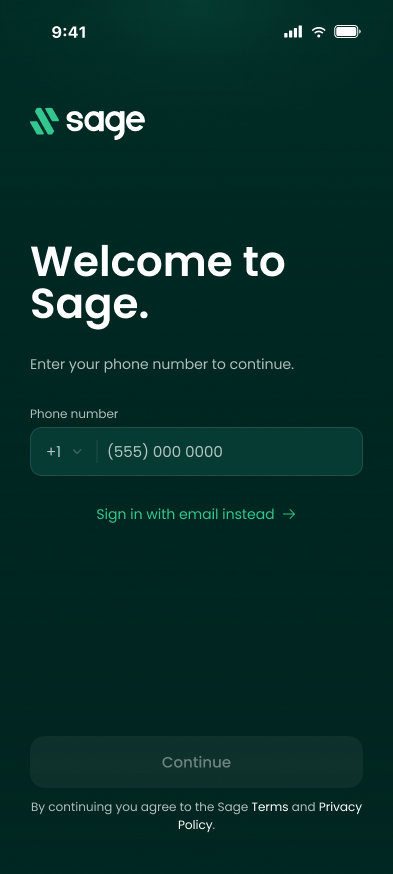
Can’t sign in with your phone number, for example because you have a new number? On iPhone, tap Need help? on Welcome to Sage., then Use email instead.
Forgot your password
The new app doesn’t have a password reset yet. Reset your password on the web, then sign in to the app with the new one.
- Open SAGE on the web - Go to sagesystems.io.
- Reset your password - On the Login page, click Forgot Password? and follow the email you receive.
- Sign in to the app - Use your email and your new password.
The same goes for changing a password you still know: the app doesn’t have a change-password option, so use Forgot Password? on the web.
Log out
Tap your photo or initials at the top left of the home screen to open Settings, scroll to the bottom and tap Log out. The app signs you out right away.
If something goes wrong
| Message | What it means | What to do |
|---|---|---|
| Too many attempts. | You asked for too many codes in a few minutes. | Wait a few minutes, try a different phone number, or tap Sign in with email instead. |
| “That code is incorrect or has expired. Please request a new one and try again.” | The code was mistyped or is more than 5 minutes old. | Tap Resend Code and enter the new code. |
| An error under the password | The email or password is wrong. | Check both and try again, or reset your password on the web. |
| No pending invite (iPhone) | SAGE didn’t find an account or an invitation for that phone number. | Try Sign in with email instead. If you’ve never had a SAGE account, ask your property manager for an invitation. |
Still stuck? Contact your property manager or support@sagesystems.io.
Need help?
Questions? Contact us at support@sagesystems.io.