Administration
Notes and long-term rentals
Last verified: October 4, 2026Notes
Notes on a property are standing instructions for the people working the gate, such as arrival instructions or access exceptions. Gate staff see them when they look up the property.
- Go to Administration, open the property and select the Notes tab.
- Click Add note.
- Type the note and click Save note.
The Notes tab lists each note with who added it and when.
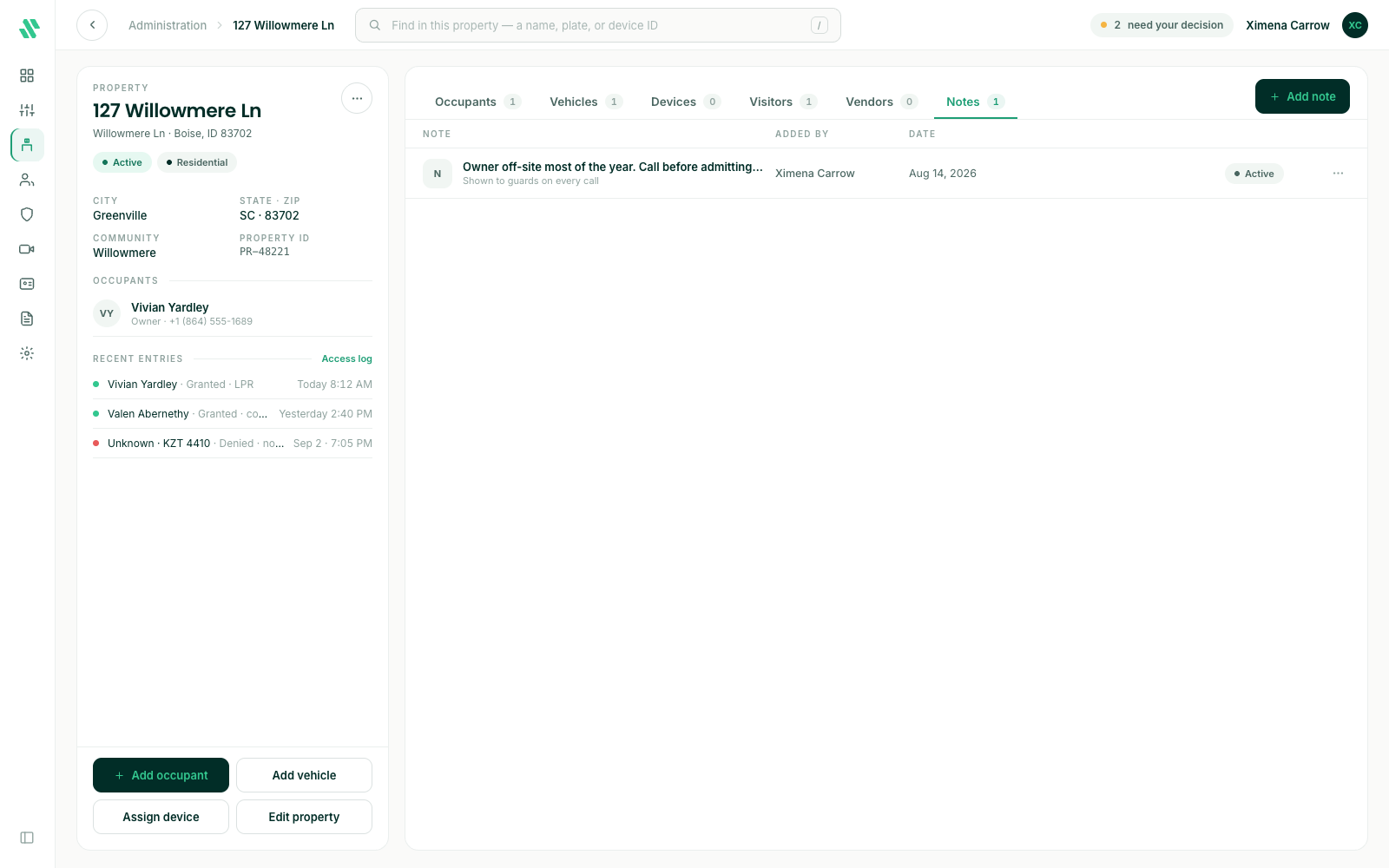
To change or remove a note, click the ⋯ at the end of its row and choose Edit note or Delete note….
Rent a property long term
A long-term rental is a property leased to tenants for a fixed period.
- Open the property and click Edit property.
- Under Type, choose Rental.
- Under Tenancy, choose Long-term.
- Set the Lease start and Lease end dates.
- Click Save changes.
The property’s type changes to Rental and the property card shows the lease dates. Owners and occupants stay on the property.
Renting a property cancels any active one-time codes its occupants created.
Add tenants
Tenants are added like any other occupant: on the Occupants tab, click Add occupant and pick Tenant · long term as the Member type. They’re sent an invitation and get access once they accept it. See Property occupants.
For rentals by the night or week, see Short-term rentals.
Need help?
Questions? Contact us at support@sagesystems.io.