Guests
Edit guest access
Last verified: October 4, 2026You can change a guest’s schedule, pause their access, or remove them at any time. Your guests are on the Guests tab (Guest on Android), under Guest list.
Find a guest
The top of the list shows how many guests you have and how many are active. Use Search by name, or tap a filter: All, Active, Pending, Expired or Suspended. Tap a guest to open their details. You see each property they can enter, with a label like Guest, Vendor, Visitor, Pending, Suspended or Expired, and when they can come.
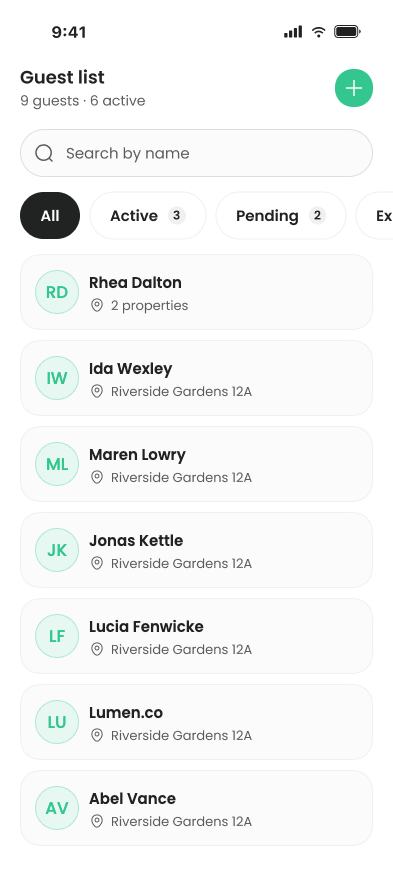
Change or pause a guest’s access
- Open the guest - On the Guests tab, tap the guest.
- Manage access - Under the property you want to change, tap Manage Access.
- Change the schedule - Switch between Always, Temporary and Recurring, and update the dates or times. See Types of access.
- Pause access (optional) - Turn on Suspend guest access. On iPhone, confirm with Confirm. Their access at that property stops until you turn it off again. You don’t have to remove them.
- Save - Tap Save Changes. On iPhone you’ll see Access updated.
You can’t change a guest’s name here.
Remove a guest
You can remove a guest from one property or from several at once.
- Open the guest - On the Guests tab, tap the guest.
- Start revoking - Tap Revoke Access (Revoke access on Android).
- Pick properties - Select each property to remove them from, then tap Revoke access.
- Confirm - The app asks “Revoke [name]‘s access?” Tap Confirm.
You can also remove a guest from one property from Manage access by tapping Revoke Access and confirming. Removing a guest can’t be undone. To give them access again, invite them again. See Grant guest access.
Guests who haven’t accepted yet
A guest who hasn’t accepted their invite shows as Pending. You can’t change a pending invite, only cancel it. Open the guest and tap Cancel invitation under that property.
Visitors
Visitor entries are people added for guard check-in rather than with a digital key, for example by your property manager. On iPhone, you can remove a visitor with Revoke Access from Manage access. Changing a visitor’s schedule isn’t saved yet.
If something fails, iPhone shows “An Error Occured” with the reason. Try again, or contact your property manager.
Need help?
Questions? Contact us at support@sagesystems.io.