Modules
Activity
Last verified: October 4, 2026Activity is your community’s record of what happened at the gates beyond the access log: the plates your cameras read, and the reports your guards file. Open it from the left rail.
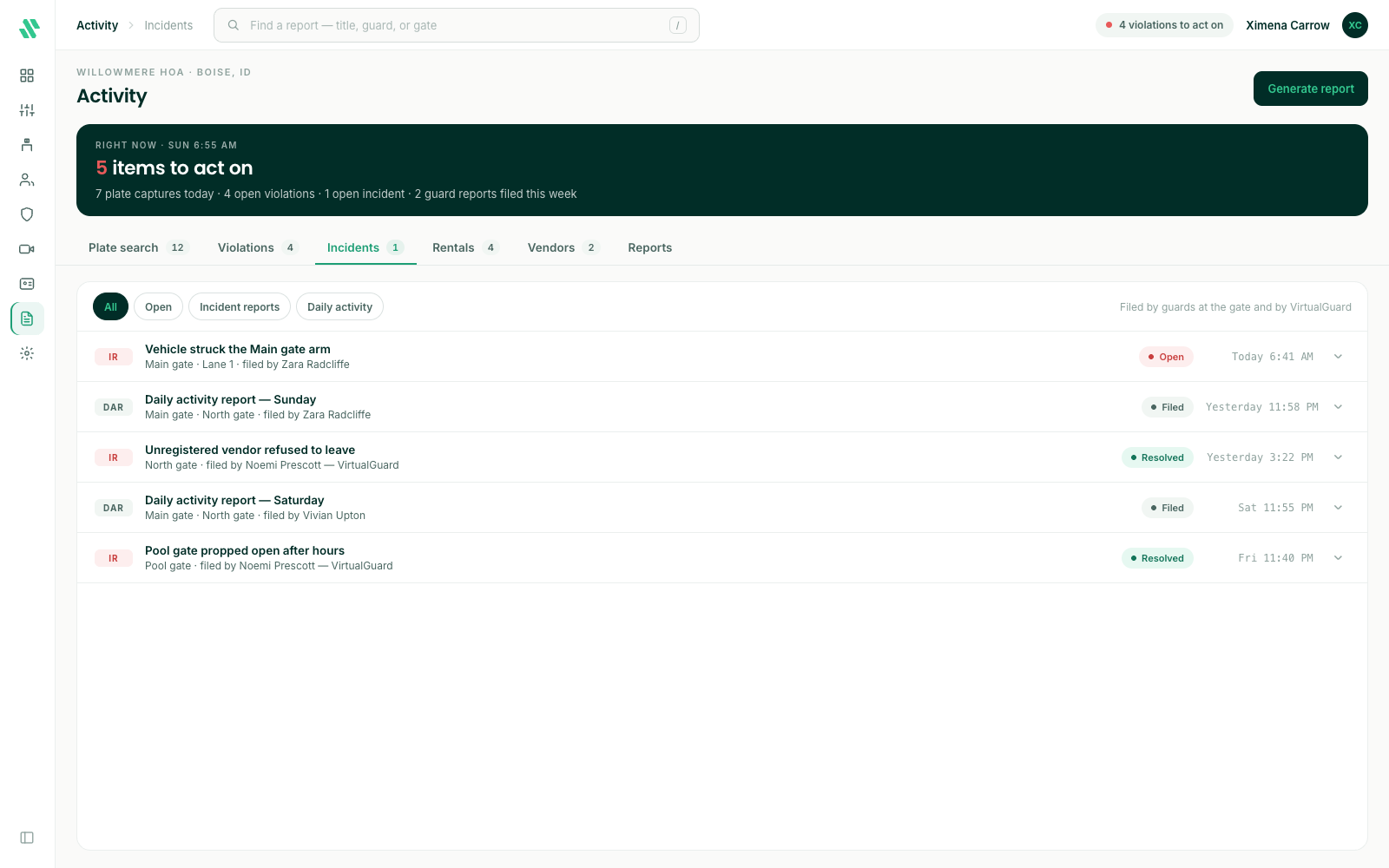
The dark band at the top counts what needs your attention, such as open incidents.
Plate search
The Plate search tab lists the license plates your cameras have read, newest first. See Plate search.
Incidents
The Incidents tab lists the reports guards file, at the gate or from Virtual Guard. You need the Manage Reports permission to see it.
- IR (incident report) - Something that happened, such as damage to a gate arm or a visitor who refused to leave. An incident report stays Open until someone marks it resolved.
- DAR (daily activity report) - The guard’s summary of a shift. It shows as Filed.
Use the chips to show All, only Open reports, only Incident reports or only Daily activity reports. Type in the search box at the top to find a report by its title, the guard or the gate.
Read and resolve an incident report
- Click a report to see its summary and key facts.
- Click Open report to read the whole filing: the guard’s narrative, the timeline, and the people and vehicles involved.
- Click Export PDF to save a copy, for example for your board or the police.
- When the incident is dealt with, click Mark resolved.
You can export a report as a PDF whether it’s open or resolved.
Need help?
Questions? Contact us at support@sagesystems.io.