Your account
Your data and deleting your account
Last verified: October 4, 2026You can ask for a copy of your SAGE data, or delete your account, from Privacy & security in Settings. To get there, tap your photo or initials at the top left of the home screen, then tap Privacy & security.
Download your data
- Open Download my data - In Privacy & security, tap Download my data.
- Request the link - Tap Send download link.
- Check your email - SAGE gathers your account data and emails a secure download link to the email address on your account. The link works for 7 days.
You can have one request in progress at a time. Once the link has arrived, you can ask for a fresh copy whenever you like.
On iPhone, Download my data doesn’t send a request yet, even though the screen says a link was sent. Until that’s fixed, use the Android app or contact support@sagesystems.io for a copy of your data.
The Android app lets you edit the email address on this screen, but SAGE sends the link to the email on your account. To use a different address, change your email in Personal info first. See Your profile and settings.
Delete your account
Deleting your account removes your access to every property. You have 30 days to change your mind.
- Open Delete account - In Privacy & security, tap Delete account.
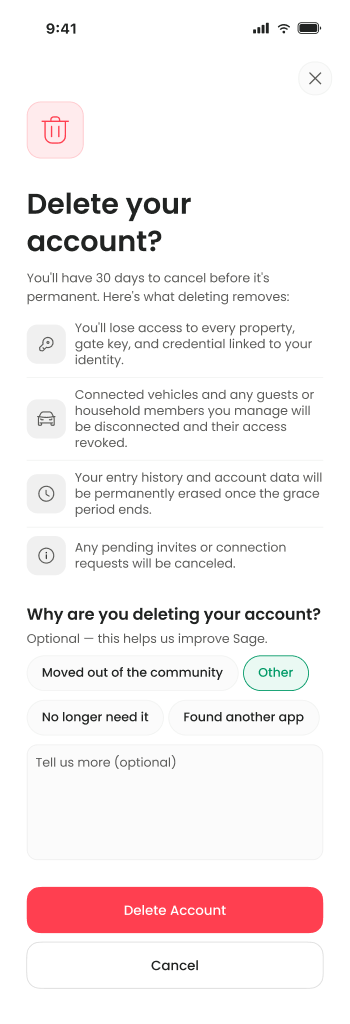
- Review what’s removed - Read the list on Delete your account? Choosing a reason is optional.
- Confirm - Tap Delete account. SAGE texts a 6-digit code to the phone number on your account.
- Enter the code - Type the code. It expires in 5 minutes. Entering it confirms the request.
Your account is then locked and the app signs you out. On Android you first see Account deletion scheduled; tap I understand. SAGE also emails you to confirm the request and the date it becomes permanent.
What deleting does:
- You lose access to every property, gate key and credential linked to your identity.
- Connected vehicles, and any guests or household members you manage, are disconnected and their access revoked.
- Pending invitations and connection requests are cancelled.
- After 30 days, your entry history and account data are permanently erased.
If your account has no phone number, the app says “Phone number unavailable”. Add one in Personal info first.
Change your mind
To cancel the deletion, sign in again within 30 days with your phone number: on Welcome to Sage., enter your number and the code SAGE texts you. That cancels the deletion and unlocks your account. Then sign in as usual. See Sign in.
Signing in with your email and password doesn’t work while deletion is pending, because the account is locked. Start with your phone number. After you enter the code, the app may not take you straight in (on iPhone it shows No pending invite). Go back and sign in again; your account is restored.
Other settings on this screen
Privacy & security also shows app lock, passkey, location, entry history and session options. These don’t change anything yet.
Need help?
Questions? Contact us at support@sagesystems.io.