Guests
Types of access
Last verified: October 3, 2026This guide is for the SAGE app (version 3) and management portal you use today. See the guide for the new apps.
When you invite a guest, the Access Schedule screen controls exactly when they can get into your community. Pick one of three options at the top of the screen. You can change it later from Edit guest access.
| Option | When your guest can get in | You set | Good for |
|---|---|---|---|
| Always | Any day, any time, from the start you choose, with no end date. | Start Date and Start Time | Family and close friends |
| Temporary | Only between a start and an end. | Start Date, Start Time, End Date, End Time | Short-term guests, or a vendor working on your home for a few days |
| Recurring | Only on the days you choose. With All Day Access on, any time on those days. With it off, only between a Start Time and End Time. All Day Access starts on for iPhone and off for Android. | Days under Choose Days, and the times if All Day Access is off | Your pool or landscaping company |
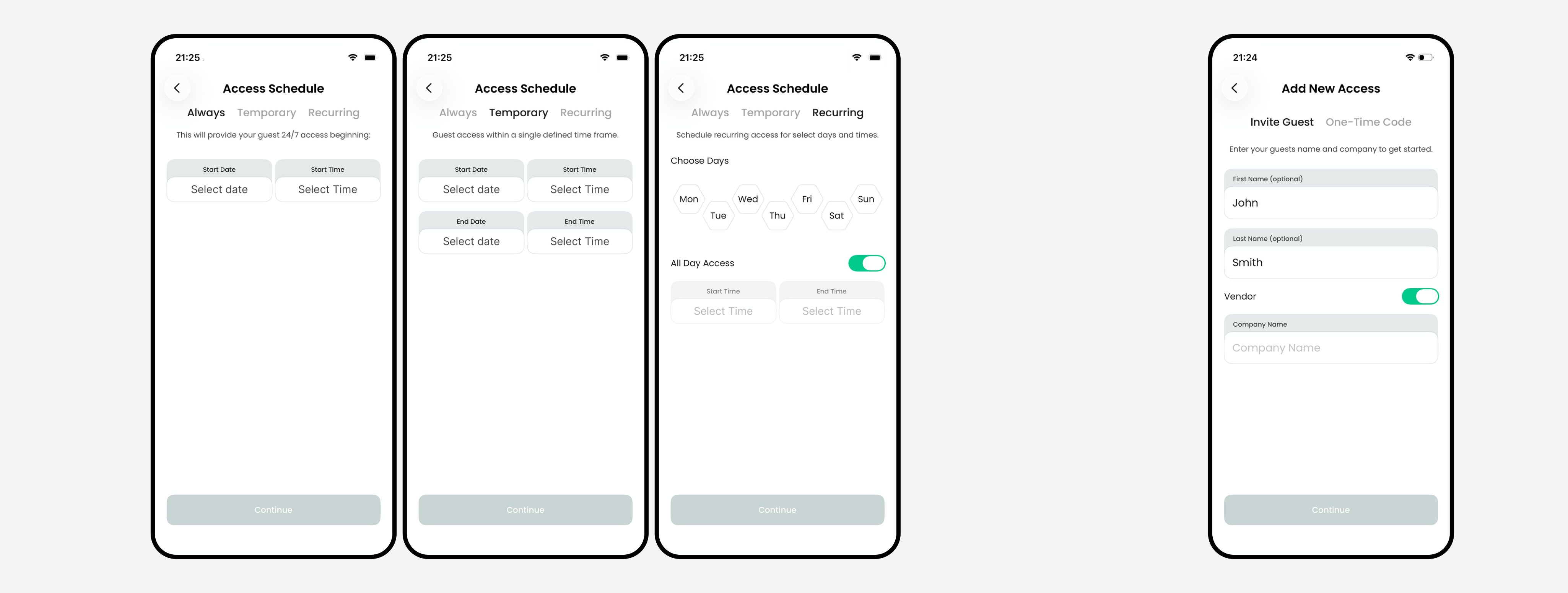
If your guest tries to get in outside their schedule, the gate won’t open for them.
The option is called Always in the app. In your guest list, the line under a guest’s name may say Anytime when their access has no day or time limits.
If you’re renting
If you rent your home, your guests’ access must fall within your rental period. If your stay is short-term, the app skips the choice and only offers Temporary, with dates limited to your stay.
Need help?
Questions? Contact us at support@sagesystems.io.