Your account
Notifications
Last verified: October 4, 2026This guide is for the SAGE app (version 3) and management portal you use today. See the guide for the new apps.
SAGE keeps you up to date on activity at your property. You get a push notification on your phone when something happens, and the app keeps a history so you can look things up later.
What you’re notified about
Some examples:
| Notification | When |
|---|---|
| Access Granted | A guest or vendor arrives at the gate (“[name] has arrived at the gate”). |
| Your Entry Code Was Used | Someone uses a one-time code you created to enter the community. |
| Access Expiring Soon | A guest’s access is about to end. |
| You’ve been invited! | You’re invited to another property. |
| Property access updated or Property access suspended | Your own access to a property changes. |
| An announcement | SAGE sends a message to people at your community. It shows the title and text SAGE wrote. |
Which notifications you get depends on your role at the property. For example, arrival notifications go to the household’s primary members, not to every occupant.
See your notification history
Tap the bell  at the top right of the home screen. The number on the bell is how many notifications you haven’t seen yet.
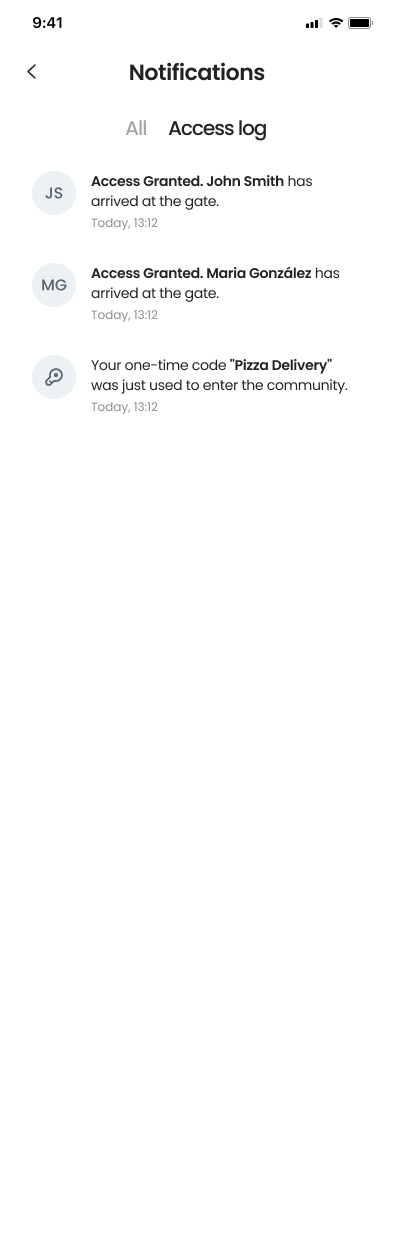
The Notifications screen has two tabs:
- All - Every notification, newest first.
- Access log - Only entries at the gate, including when your one-time codes are used.
Opening the screen marks your notifications as read. If your role at the property isn’t resident (for example, a guest or community staff) and you haven’t verified your identity, tapping the bell asks you to verify first. On Android the bell is turned off when you have no valid access key for the property.
Push notifications on your phone
To get push notifications, allow notifications for SAGE when your phone asks. If you said no, or notifications stopped, turn them on for SAGE in your phone’s settings. The app doesn’t have its own notification settings. Even with push notifications off, notifications still appear in the app’s history.
Need help?
Questions? Contact us at support@sagesystems.io.